Limited Creator Edition · Completely free (beta)

Local Windows NLE — reframe 16:9 to 9:16 in one click. No upload. No account.

Edit Faster. Create Better.

The next-generation NLE designed for creators. Automatic reframe, caption-based editing, and noise cancellation — local, and built for the cut.

Scanned with multiple antivirus engines — VirusTotal report · Download page

CreatorsLimited free edition
LocalOn your device
ExportHardware when available
vistora_project_v1.proj
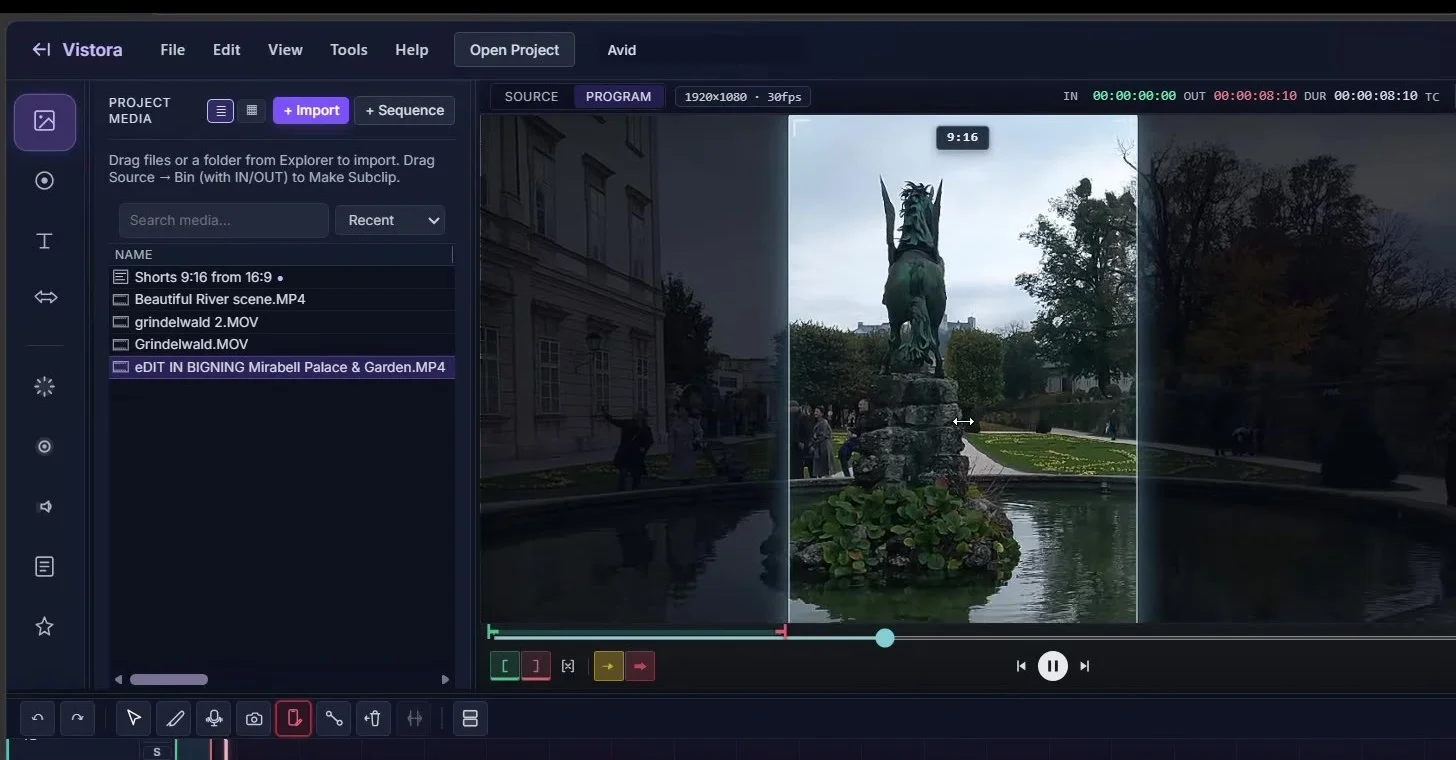
Vistora UI showing 9:16 reframe
Vertical Edit
Auto Reframe Active

Auto Reframe

16:9 to 9:16 in one click. Drag to crop, keyframe movement, and export instantly.

Caption Edit

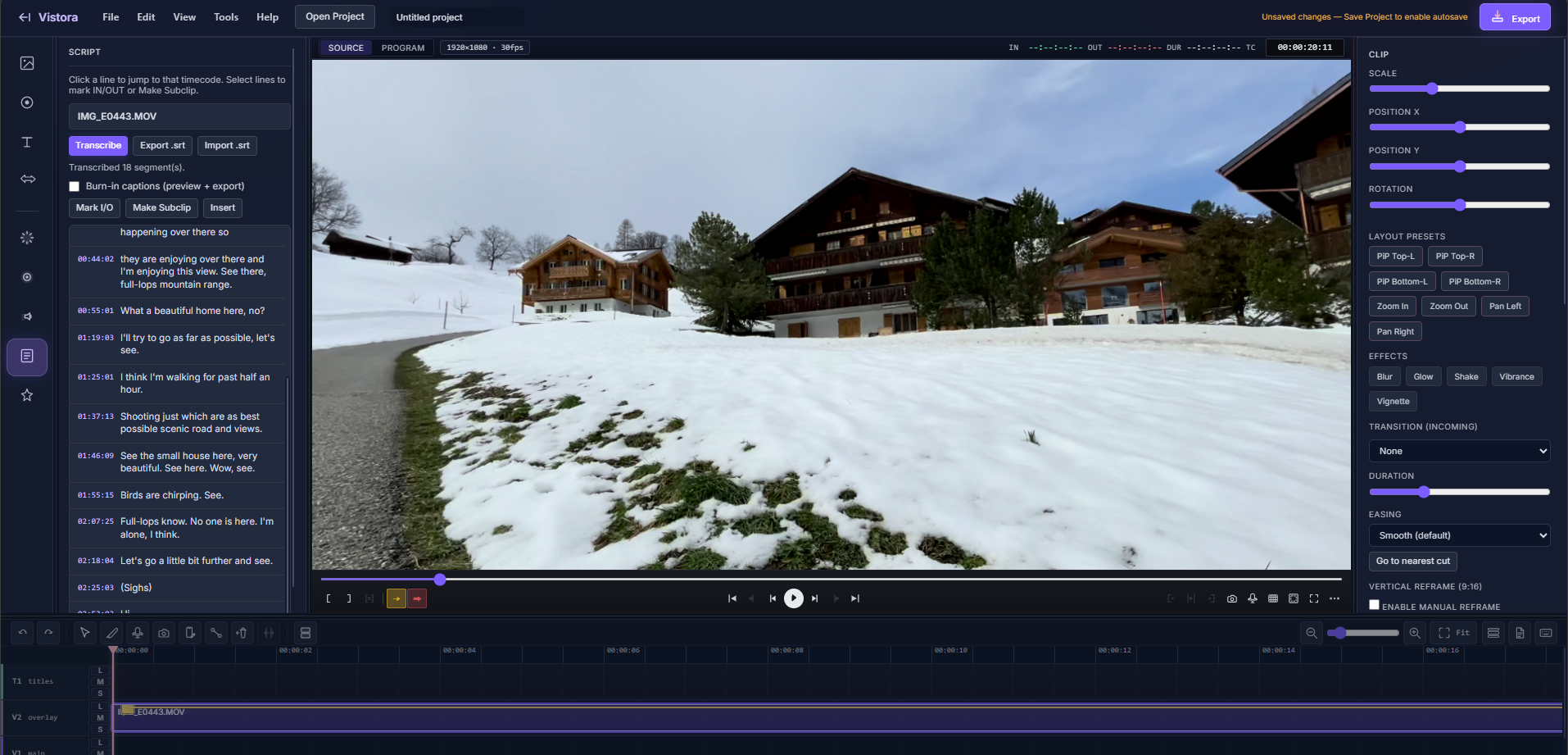
Local transcription and script-based editing — click a line to jump and cut from dialogue.

Noise Cancel

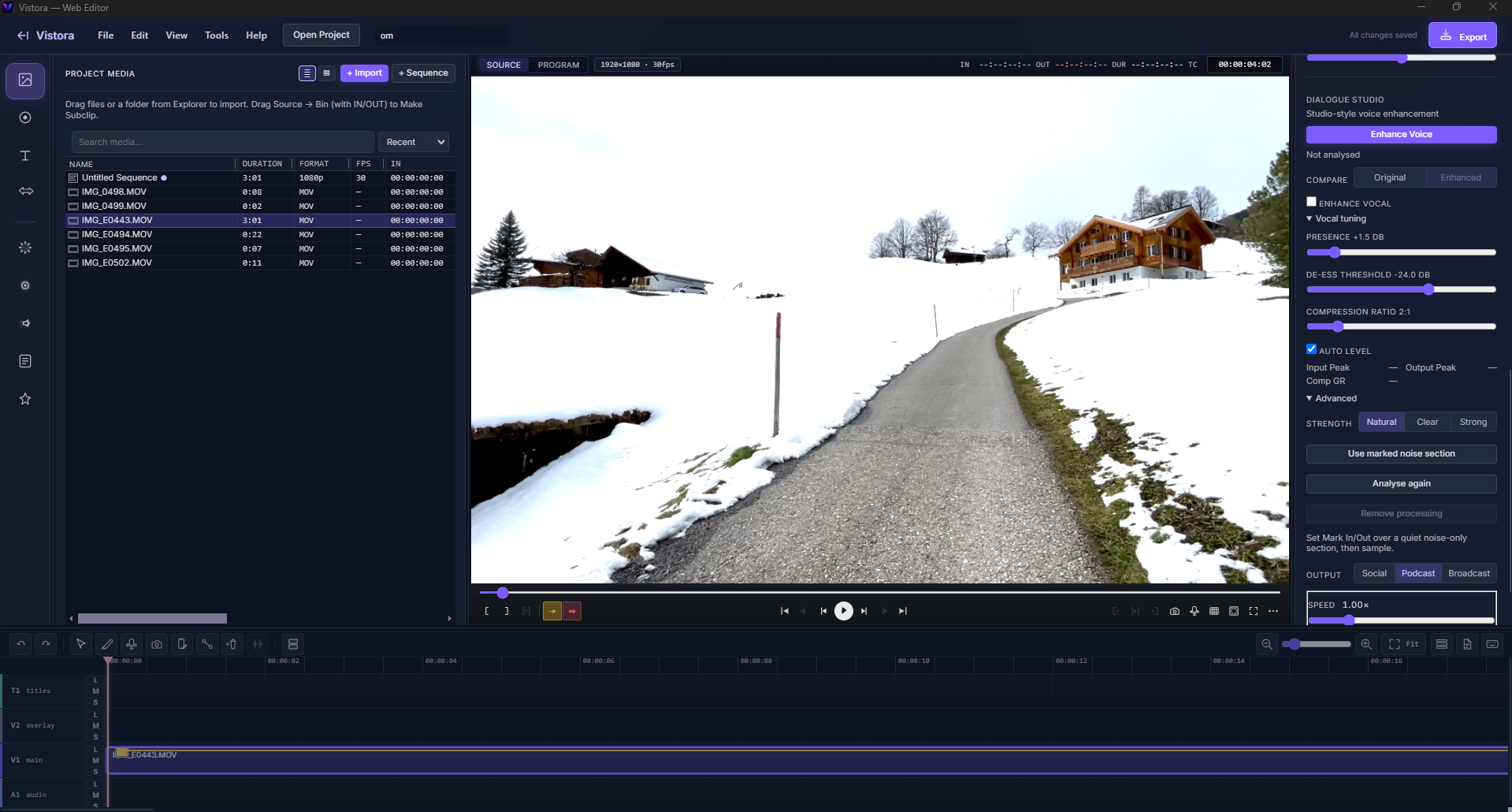
Clean up dialogue and reduce background noise, processed locally on your device.

Creator Edition

Limited Creator Edition — completely free (beta). No watermark. Multi-track timeline with robust export options.

Jump to Reframe Captions Noise Titles Toolset Export
Product

Everything Vistora does right now

Beta v1.4.0 — every capability below ships today. Local processing. No upload. Built for social and long-form creators.

Reframe

16:9 to 9:16 automatic reframe

Reframe horizontal footage to vertical in one click. Drag to choose the crop position, keyframe it if the shot moves, then export — no duplicate timeline required.

Shown: trimmed clip of the live 9:16 reframe over horizontal footage.
Script-Based Editing

Edit from the transcript

Local transcription with script-based editing — click any line to jump the playhead, then mark, subclip, or insert from the dialogue instead of scrubbing a waveform. Review the transcript before you publish.

Shown: Script panel with timecoded transcript and click-to-jump navigation.
Vistora Script panel and local transcription
Noise Cancellation

Clean up dialogue, locally

Reduce background noise in your audio. Processing runs on your device — nothing is uploaded to enhance a clip.

Shown: Voice enhance / Dialogue Studio with local processing.
Vistora voice enhance dialogue studio
Titles

Simple titles

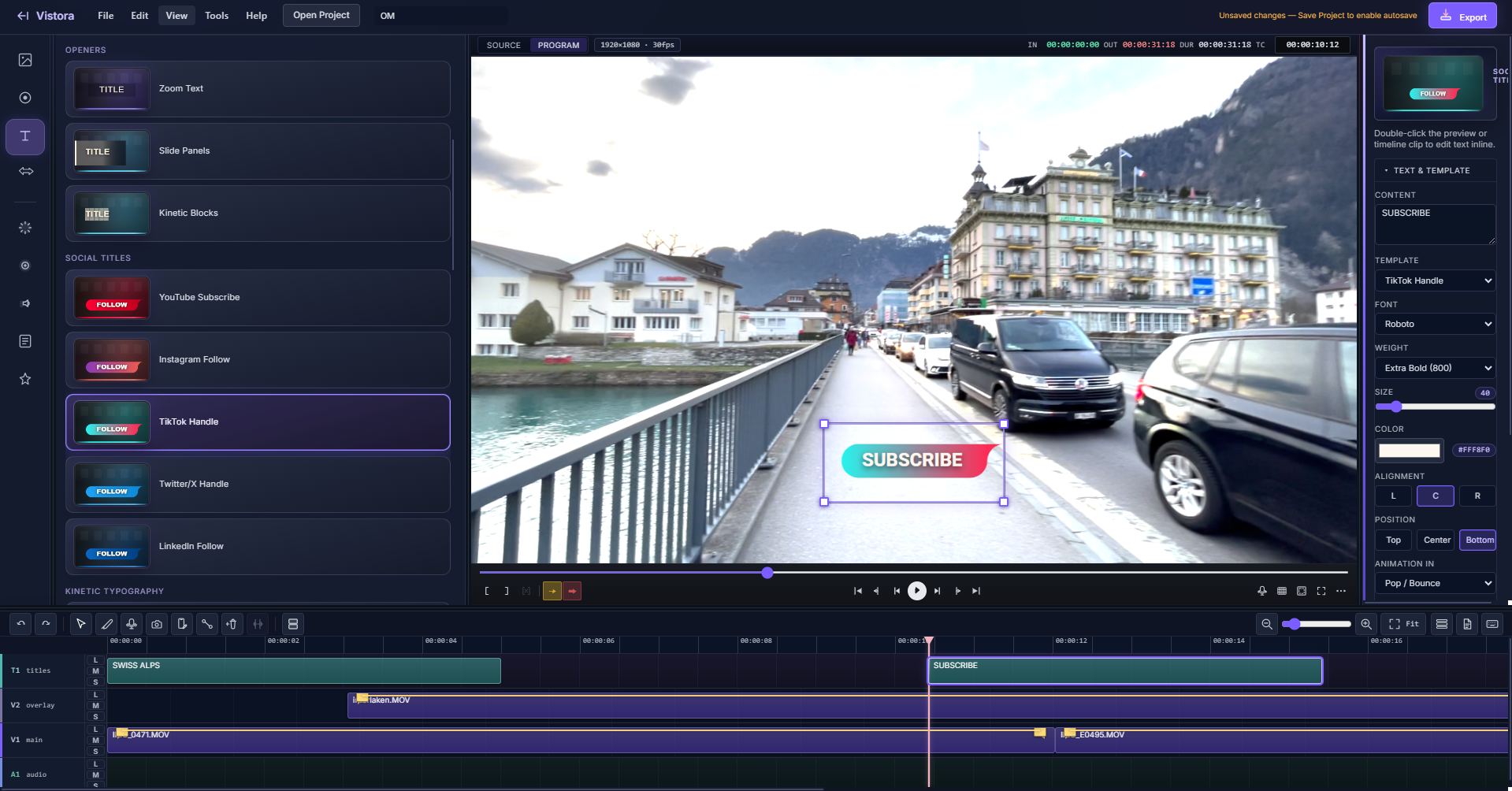
Straightforward title templates you can drop onto the canvas and adjust. Not a motion-graphics suite — built for getting text on screen quickly.

Shown: Title Studio with templates and inspector.
Vistora Title Studio templates
Full toolset

Every capability, highlighted

From timeline craft to Fast Export — the complete Vistora surface in one place.

Creative essentials

From features.html
  • Simple transitionsFifteen production templates between clips — dissolves, wipes, slides, zooms, and more.
  • One-click looksWarm, Cool, Moody, and Vintage color looks for fast grade direction.
  • Clip effectsBlur, Glow, Shake, Vibrance, and Vignette — with per-effect amount controls.
  • Transform & motionScale, position, and rotation; PiP presets; Ken Burns zoom and pan.
  • Stickers & graphicsSocial stickers (Subscribe, Thumbs Up, Bell, Arrow) drag onto V1/V2.
  • Multi-track timelineVideo, audio, and title lanes with trim, split, ripple, and undo/redo.
  • Screen recordingPick the exact screen or window from a live picker, with system audio and your microphone recorded together.
  • Screen + webcam PiPComposite screen and camera together with picture-in-picture.
  • Screen + voiceScreen and microphone only, with no camera in the panel.
  • Auto-minimize on recordThe recorder and app window get out of frame automatically once a screen recording starts.
  • Phone as camera & micUse an Android or iPhone as the camera and microphone — usually sharper than a laptop webcam.
  • Voice-overRecord narration onto the timeline at the playhead.
  • Add Audio LayerAdd an optional second audio track from the Tools menu or by right-clicking the timeline.
  • Thumbnail snapshotsGrab a still from the Program monitor for thumbnails and covers.
  • Burn-in captionsEmbed generated subtitles into preview and export.

Edit craft

Timeline & monitors
  • Source / Program monitorsMark sync, still-frame open, and dual-monitor workflow.
  • Insert · Overwrite · ExtractV / B / X editing with Mark In–Out extract and ripple close.
  • J / K / L shuttleProfessional reverse, stop, and forward playback control.
  • Blade & selectionC blade, A selection, lasso multi-select, and ripple delete.
  • Clip speedConstant retimes from 0.25× to 4× with pitch tracking.
  • Sequence binSequences live in Your media — duplicate a cut without leaving the bin.
  • Markers & snapSequence markers, snap, and keyboard-driven navigation.
  • Shortcut referenceIn-app keyboard map from the Timeline toolbar — every cut key in one place.
  • Fullscreen viewerPlayer fullscreen for focused review (toolbar or F11).
  • Autosave & projects`.vistora.json` save/load with background autosave.
  • Smart RelinkReconnect offline media when paths move.

Audio & script

Local intelligence
  • Clip waveformShow audio waveforms on the timeline for visual trimming and level cues.
  • Fade in / Fade out + panMillisecond fades, stereo pan, gain, mute, and interactive envelope handles.
  • Local Whisper STTOn-device speech-to-text with Import / Export `.srt`.
  • Script panelJump, mark range, make subclip, and insert from dialogue lines.
  • Dialogue enhanceLocal voice enhance / denoise — fully offline.
  • Audio envelopesGain shaping, ducking, and detachable audio lanes.

Performance & delivery

Ship-ready
  • Fast ExportVideo-first native path with adaptive hardware ranking.
  • Hardware encodeNVENC → QSV → AMF → VideoToolbox → libx264 fallback.
  • Social profilesYouTube, Shorts, Instagram Reels/Feed, and Facebook delivery presets.
  • Loudness normalizeSocial delivery applies YouTube-class loudnorm (−14 LUFS) on applicable export profiles.
  • NLE interchangeFCPXML, Premiere XML, and EDL for Premiere, Resolve, and FCP.
  • Preview RenderCached WebM preview for smoother scrubbing of heavy stacks.
  • Reveal in ExplorerJump from clip or export straight to the file on disk.

Export & format support

Vertical presetsShorts, Instagram Reels, Instagram Feed
Long-formYouTube 1080p / 4K, Facebook
Loudness−14 LUFS loudnorm on social delivery profiles
Editor interchangeFCP XML, Adobe XML, EDL
SubtitlesSRT export, TXT export, embedded burn-in

Frequently asked questions

What is Vistora?

Vistora is a local Windows video editor (NLE) for creators. It includes automatic 16:9→9:16 reframe, caption-based editing, noise cancellation, and Fast Export — without uploading your media.

Is Vistora free?

Yes. The Limited Creator Edition is completely free (beta) — no account, no watermark, runs on your computer.

Does Vistora work offline?

Yes. Editing, transcription, dialogue enhance, and export are designed to run locally on your device. An internet connection is only needed to download the app.

Is Vistora good for YouTube Shorts and Reels?

Yes. One-click vertical reframe plus social export presets (Shorts, Instagram Reels/Feed, YouTube, Facebook) with loudness normalize on applicable profiles.

Try it yourself

Limited Creator Edition — completely free (beta). No account, no watermark, everything local.